
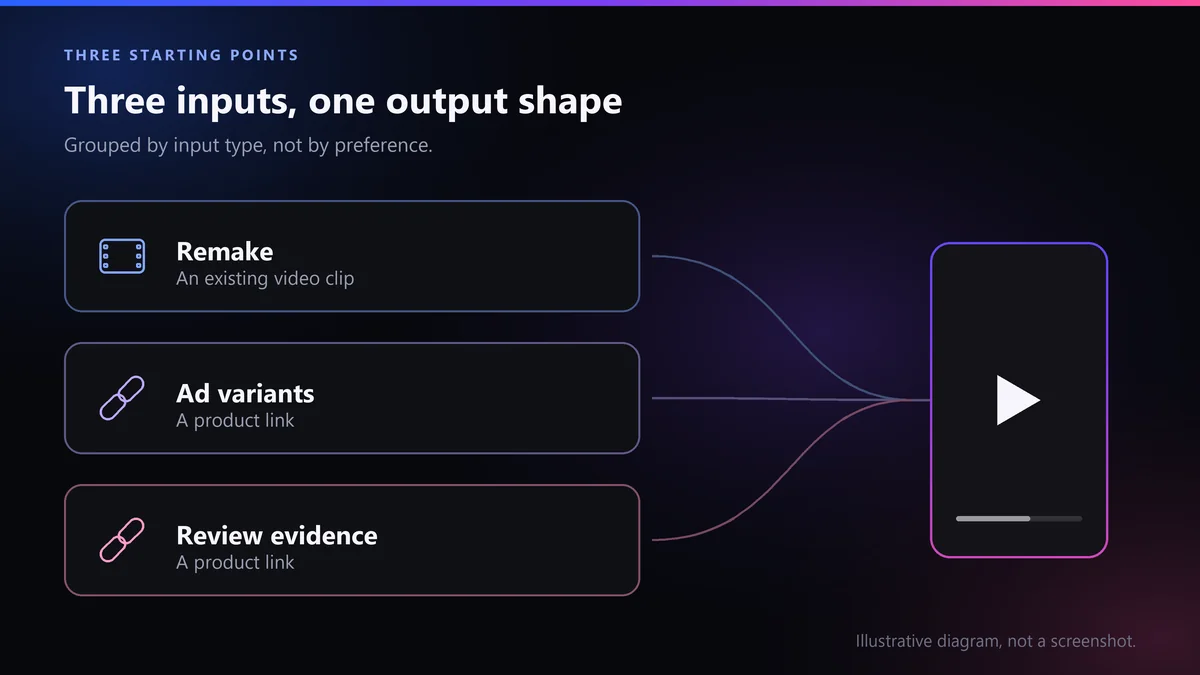
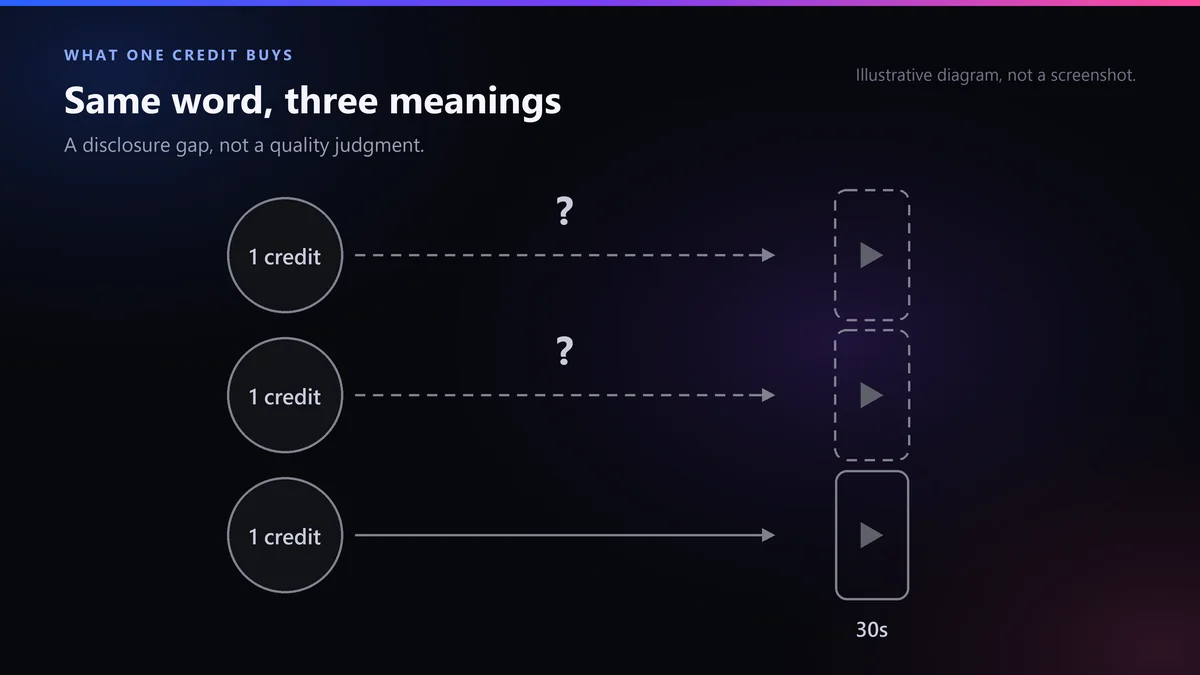
These three tools start from three different things: Pody rebuilds a video you already have, Creatify turns a link into paid-social ads, LikeFlow builds the script from the listing’s own review evidence. All three sell credits. On the vendor pages we read September 22, 2026, only LikeFlow — whose page this is — states a rule per credit: “1 credit = 1 30-second video”. The other two state plan-level counts instead.
Disclosure, before the first table: LikeFlow publishes this page and is one of the three products on it. We have a financial interest in your answer, so this page is built to be checkable rather than persuasive. Every Pody and Creatify figure below was read on that vendor’s own pages on September 22, 2026, and we say for each one whether we found a struck-through price, a discount badge or promotional wording next to it. The only per-video dollar figure on this page is ours, for a reason we explain in full. The section headed “Where LikeFlow loses to both of them” is not a formality.
The short version
- Choose Pody if your starting material is a video rather than a product page — an ad that already converts, which you want rebuilt around a different product, or an existing video you want localized into other languages. Its own homepage frames the job as “Recreate Winning Videos for Your Product”.
- Choose Creatify if you are running paid social and the unit of work is variants of one product rather than one video each for many products. It says it turns “any link into a ready-to-post video”, and its volume framing is “Batch create a dozen variations at once”.
- Choose LikeFlow if you have a list of product links and you want the script anchored to what buyers actually wrote on the listing. That is the narrow case we are built for, and it is narrower than the cases the other two are built for.
- The unit matters more than the price. A credit is not a standard unit. Read on September 22, 2026, LikeFlow’s pricing card carries a rule per credit — “1 credit = 1 30-second video”. The closest equivalent on the Pody page we opened is a plan-level range, “Up to 24 videos, depending on video length”; on the Creatify page, a video count printed for the free plan only. That is a difference in how precisely the unit is stated, not a difference in quality.
- LikeFlow does not post for you, and none of the three writes your affiliate disclosure. Creatify advertises a publish step on its own site — “Push live to social channels instantly” — while on the Pody pages we opened September 22, 2026 we found none. LikeFlow hands you a file: scheduling, posting and the judgment about what is fit to go out stay with you.
What does each of the three actually start from?
Pody starts from a video, Creatify from a link pointed at paid ads, and LikeFlow from a link plus the listing’s own review evidence. This is the question that settles most of the choice, and it settles it before price comes up. If a tool wants a video and you have a spreadsheet of product links, no feature further down its page rescues the fit. The table describes what each vendor says on its own pages, read September 22, 2026.
| Pody | Creatify | LikeFlow (ours) | |
|---|---|---|---|
| What you hand it | A video and a product image. Its homepage says “all you need on your end is a product image”. We did not find a product-URL field on the pages we opened | A link — “Turn any link into a ready-to-post video” | A link. The input reads “Paste a product link (Amazon, Shopee, TikTok Shop...) — get promo videos in minutes.” |
| What it is pointed at | Rebuilding creative that already works: “Recreate Winning Videos for Your Product — Keep the core idea, swap in your product…” | Paid social. Its headline is “AI Ads that win.” and it lists “Works with Meta, TikTok, Youtube, Snap, Amazon and more” | Listing video built from review evidence. The site itself reads “Built from real buyer-review evidence” |
| Where the script’s claims come from | The reference video you supply. We found no mention of Amazon, affiliates or product reviews on the pages we opened | The link and its templates. We found no mention of review-sourced scripts on the pages we opened | The listing’s own review evidence, and it refuses without it: the app shows “Customer review evidence required” and “Product lacks review evidence.” |
| Volume framing, in its own words | “batch produce 100+ ad variations in a single go” | “Batch create a dozen variations at once” and “From 10 ads a month to 10,000” | One at a time in the app. The spreadsheet runner is internal-only — see the honesty section below |
| Localization of finished video | Sells it as a feature: “batch localizes videos into 13+ languages with native AI dubbing and lip-sync” | The Starter card lists “75+ Languages” | We do not package a translate-and-dub feature, and this page makes no claim about output voices |
| A presenter built from your own face or voice | “Product Avatar Video” is listed among its tools, described there as avatars presenting your product. We found no mention of a presenter built from your own face or voice on the pages we opened | The Pro card lists “1,500 Realistic AI Actors + 3 Custom Avatars”. The card does not say what a Custom Avatar is built from, and we found no definition on the pages we opened | Not sold. You choose from a fixed presenter library; nothing in it is built from you. |
How precisely does each one say what a credit buys?
All three price in credits, and the word does not mean the same thing three times. The test that matters to a buyer is narrow: can you turn the plan’s credit total into a number of finished videos using only what the vendor prints on that page? On September 22, 2026 all three gave us something, and only one — ours — printed a figure per credit rather than an estimate at plan level.
Two rates are published; they are not the only rates LikeFlow charges. The published rules — 1 credit for a 30-second video, 5 for a UGC review video — are the rules this page divides by. Editing actions inside LikeFlow carry their own credit costs, each shown on the button that spends them before you click it. Those costs are not on the pricing page, so any video count or per-video figure on this page is the best case those two published rules allow, not a forecast of a working month.
| Tool | What its own published plans say the credits turn into | Per-video dollar figure this page will print |
|---|---|---|
| Pody | No rule per credit. The Pro row states a plan-level range instead — “Up to 24 videos, depending on video length” — and the Free row gives that plan’s clip lengths, “1 video: 4s / 5s / 6s / 7s” | None. We are not deriving one from a page that does not carry a rule per credit — the conversion, with its own access date, is on our Pody page |
| Creatify | No rule per credit on the pricing page we opened. The only place credits were tied to a video count was the free-plan paragraph: “The Free Plan includes 10 monthly credits. Create up to 2 video ads or 20 image ads” | None. We are not deriving one from a page that does not carry a rule per credit — the conversion, with its own access date, is on Creatify Pricing Explained |
| LikeFlow (ours) | A rule per credit, stated on the pricing card: “1 credit = 1 30-second video”, with “UGC review videos use 5 credits each” | ≈$0.29 a 30-second video on our own $29 / 100-credit Starter plan, monthly billing — our arithmetic, $29 ÷ 100, not a rate published as such |
Read that last column as a statement about disclosure and nothing else. It does not say Pody or Creatify is expensive, and it does not say either of them hides anything: we have done that conversion on two separate pages of ours, each carrying its own access date. What it says is that on the page where you are asked to pick a plan, one of the three prints a figure per credit and two print counts at plan level, which you have to convert yourself before the arithmetic works. If you are buying at volume, go and do that conversion — for whichever of the three you choose, including ours.
What do the three cost, and why does this page stop there?
Because a comparison page that leans on somebody else’s price is wrong within a week, and a wrong number about a competitor’s price is not a typo — it is a comparative claim. So before printing anything we went looking for the specific thing that makes those numbers unsafe to copy: a struck-through original price, a percentage-off badge, or promotional wording sitting on the plan row itself.
Here is what we found on September 22, 2026. In Pody’s pricing section: no struck-through figure, no discount badge, no promotional wording, and no promotional banner on the page. On Creatify’s pricing page: no struck-through figure and no discount badge on any plan row either — but the page carried a banner reading “SAVE UP TO 50% ON ANNUAL PLAN”. That matters in one direction only, and we would rather say it than have you find it: on that banner’s terms, a Creatify buyer on annual billing can pay less per month than the monthly figure we print below. We print the monthly row because it is the stable line on the page, and we print no annual figure because we could not read one on the page we opened.
| Plan row, as printed on the vendor’s page | Credits included, as published | Struck-through price, % off badge or promo wording on the row? |
|---|---|---|
| Pody — Free, “$0/ Month” | “150 lifetime credits” | None found |
| Pody — Pro, “$19/ Month” | 2,000 credits a month | None found |
| Pody — Enterprise | No public figure; the card says “Contact Us” | No price shown to mark up or down |
| Creatify — Free | “The Free Plan includes 10 monthly credits” | None found |
| Creatify — Starter, “$39” “/ month” | “100 Credits / mo” | None on the row. Page-level banner: “SAVE UP TO 50% ON ANNUAL PLAN” |
| Creatify — Pro, “$99” “/ month” | “300 credits / mo”. The card also lists 300, 500, 1,000, 2,000 and 5,000; we found no published price for the larger amounts, so $99 is the floor of this plan rather than its only price | None on the row. Same page-level banner |
| Creatify — Enterprise, “Let’s talk!” | “1,200 credits / year” | No price shown to mark up or down |
| LikeFlow (ours) — Free · $29 · $79 · $199 per month | 5 free credits, then 100, 500 and 2,000 credits a month | None. Prices shown are the monthly tab, which is the default of three |
Two things that table is deliberately not doing. It is not ranking the three by price, because the credit totals in the middle column are denominated differently and lining them up would invent a comparison the vendors have not published. And it is not converting any of them into a cost per video except ours. If you want that conversion for Creatify or Pody, it exists on our Creatify comparison and our Pody comparison, each carrying the date its figures were read — and each of those dates is older than the one at the top of this page, which is exactly why we did not copy them forward.
Which one should you choose?
Stay with Pody if what you own is creative rather than a catalog. The remake path only makes sense when there is already a video worth remaking, and that is a genuinely different asset from a list of product URLs. Of the three, it is also the one that sells localization of finished video as a headline capability — “batch localizes videos into 13+ languages with native AI dubbing and lip-sync”, in its own words — and we do not package one at all.
Stay with Creatify if the job is paid social at variant scale, or if the feature list on its cards contains something we simply do not sell — its Pro card prints “1,500 Realistic AI Actors + 3 Custom Avatars”. We sell no presenter built from your own face or your own voice, and no library that size. Testing twelve hooks on one product is the shape it is built for, and it is not the shape we are built for.
Choose LikeFlow in one narrow case: you have product links, you publish one video per listing rather than twelve per product, and you want the script tied to the listing’s own review evidence rather than to a template. The review-evidence restriction is the product, not a limitation we are apologizing for — but it is a restriction, and the next section is where it and four other things get named.
Where LikeFlow loses to both of them
A three-way comparison published by one of the three is only worth reading if its own row is the harshest one. These are the reasons to close this tab.
- The spreadsheet runner is not yours. Pody advertises “batch produce 100+ ad variations in a single go” and Creatify “From 10 ads a month to 10,000”; the equivalent path here — our own affiliate team pointing a Google Sheet at the queue — is locked to internal accounts in the commercial product. The routing rule says so in a comment, “Batch-gen (Google Sheet automation) stays internal-only in the commercial product”, and the endpoint answers outside accounts with “Batch-gen is restricted to internal accounts.” Both read in LikeFlow’s own source on September 22, 2026. Subscribe today expecting to hand us a sheet of a hundred ASINs and you have bought the wrong thing.
- No translate-and-dub feature. Pody sells localization of finished video as a headline capability. We do not package one, and this page is not going to make a claim about output voices in order to look level with it.
- Nothing in the video is built from your face or your voice. The presenter library is fixed and you choose from it. Creatify’s Pro card prints “1,500 Realistic AI Actors + 3 Custom Avatars”; the card does not say what a Custom Avatar is built from.
- Nothing posts for you here. No scheduling, no publishing, no uploading — you get a file. Creatify is ahead of us on exactly this: its own site advertises “Push live to social channels instantly” and “Connect your ad accounts once, launch forever”, read September 22, 2026. Naming that on the page where we are the seller is the point of this section.
- The review-evidence restriction cuts both ways. It is the right default for compliance, and it stops us dead on a listing too new to have reviews: the app returns “Product lacks review evidence.” rather than writing around the gap. Pody, which starts from a video you supply, and Creatify, which starts from a link and its templates, have no such gate — on a brand-new catalog, that makes both of them more useful than us.
None of this is unusual for a young product, and none of it is a reason to pick us out of pity. It is here because a comparison written by a competitor is evidence of nothing unless the competitor’s own row is the one that costs it something.